UNO!™
Mattel163 LimitedCard
4.369.22K Reviews
- Version
- 1.18.7042
- Installs
- 100.00M
- Age Rating
- Everyone
Screenshots

Our Review of UNO!™
 Analysis by Appyee
If you're a fan of classic card games, then chances are you've come across UNO!™ at some point in your life. This digital version of the beloved card game brings all the fun and chaos right to your fingertips. Let me take you through my experience with this app and why it might just be the perfect addition to your game collection.
Getting Started with UNO!™
First off, downloading and installing the app was a breeze. Available on both Android and iOS, it didn't take long before I was up and running. Once you fire it up, you're greeted with a vibrant and colorful interface that's inviting and easy to navigate. The developers have done a great job of capturing the essence of the original game while adding a modern twist.
Who will enjoy this digital card table
I’d recommend this card game most to people who already know the pleasure of a quick UNO round: friends who want an easy way to play when they are apart, family members looking for a familiar game to share, or anyone who has a few spare minutes and wants a match that needs more attention than a passive phone game. The rules are recognizable, so it’s easy to get started without asking everyone to learn a new game first.
It is less suited to someone who wants a quiet, fully offline card experience or who dislikes competitive play with strangers. A physical deck is still the better choice when everyone is around one table, because it gives you direct conversation and lets the group set its own pace. I’d also steer away from the app if you find bright presentation, social interaction, or optional spending distracting; the basic appeal is the familiar card play, not a promise that every extra will suit every player.
Game Modes Galore
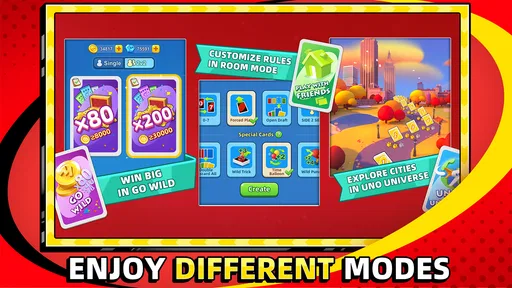
One of the things that stood out to me was the variety of game modes available. Whether you're looking to play a quick match or dive into a longer tournament, UNO!™ has you covered. The classic mode is perfect for purists, while the "2v2" mode allows you to team up with a friend and strategize against opponents. There's also the "Go Wild" mode, which adds some crazy twists and turns to keep you on your toes.
That choice matters in everyday use. If I have only a short break, I’d pick a quick round rather than commit to a longer session; if I have a friend ready to play, teaming up gives us a shared goal instead of making every decision a one-on-one contest. The trade-off is that alternative modes can change the feel of a familiar game. I’d start with classic play if I wanted the clearest test of ordinary UNO decisions, then try the more unpredictable option when I’m in the mood for variety.
Making a short session work
A realistic use for the app is filling an unplanned wait: I can open it while waiting for a ride or winding down between tasks, play a match, and put the phone away when I’m done. For a planned game with friends, it helps to agree on a mode before everyone joins. That avoids spending the first part of a call deciding what to play, and it gives a group that includes newcomers a gentler start in the familiar mode.
One small strategic habit I find useful is treating action cards as choices rather than automatic plays. Holding one can give me an option later, but keeping it too long may mean I miss a chance to respond to the table. In a team round, I also pay attention to what helps the partnership rather than simply choosing the move that looks best for my own hand. These are ordinary card-game judgments, but the app’s brisk pace makes it easy to play on impulse; taking a moment before a move can make a close round feel more deliberate.
Social Features
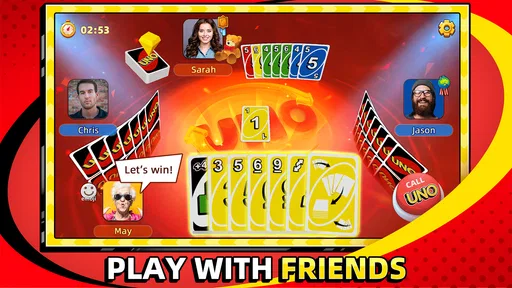
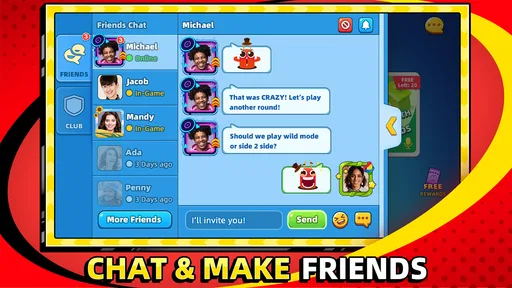
Playing UNO!™ isn't just about the cards; it's about the people too. The app offers a plethora of social features, including friend challenges and real-time multiplayer. I was able to connect with friends easily and jump into games with them, which added a whole new layer of excitement. Plus, the chat feature allows for some friendly banter—or trash talk, if that's more your style!
That social layer is a real advantage over playing against a simple computer opponent, but it also means the experience depends on who is at the other end and whether the connection holds up. I’d use friend play when I want the game to feel like a shared activity, and approach public multiplayer as a more unpredictable option. If I’m mainly after quiet practice or don’t want chat, a basic offline card game may be a better fit.
How it compares with other ways to play
Compared with a physical deck, this version removes the need to bring cards, shuffle, or gather everyone in one room; that convenience is the strongest reason to choose it. Compared with a generic digital card game, UNO’s appeal is its instantly familiar hand-management and the social tension of deciding when to change the direction of a round. A simpler app may be preferable for someone who wants no multiplayer or extra presentation, while the real deck wins for a group that values face-to-face reactions and control over the house rules.
Mattel163 Limited is the developer, and the game is free to download. Its in-app purchases range from $0.99 to $299.99 per item, so I’d treat buying as optional rather than as part of the basic decision to try it. The game is rated Everyone, which makes its familiar card-play framing easy to understand for a broad audience, though a parent should still consider whether online interaction and purchases suit their household. It has a 4.4 average from around 2.5 million ratings and over 100 million installs, which shows that it has reached a large audience, but popularity alone doesn’t tell me whether its multiplayer style is right for a particular player.
In-App Purchases
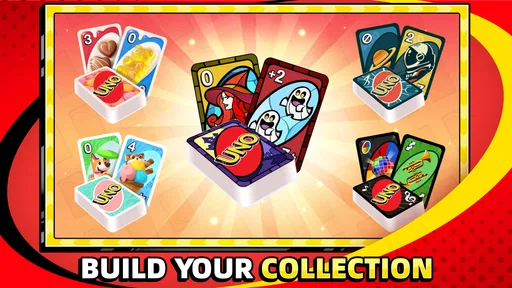
Now, let's talk about the in-app purchases. While the game is free to download, there are plenty of opportunities to spend real money. From cosmetic upgrades to special decks, it can be tempting to splurge. However, I found the game perfectly enjoyable without spending a dime, which is a definite plus.
For a cautious first try, I’d play without buying anything and decide whether the core rounds are enjoyable before considering an optional item. A high-priced purchase is not a sensible shortcut to enjoyment if what I really want is a calm, low-pressure game. The listed purchase range is broad, but it doesn’t by itself explain what each item does or whether it changes competitive play. I therefore wouldn’t assume that paying gives someone an advantage, or that every purchase is purely cosmetic; I’d inspect an item’s description and price in the app before deciding.
Progress, pressure, and fair play
The main pressure in a card match comes from the changing hand and the choices other players make. That can be exciting, but it also means a losing streak may feel personal even when the game is simply playing out a random mix of cards and decisions. I try to judge a session by whether I enjoyed the decisions, rather than treating every result as proof that I need to spend or keep playing.
For competitive fairness, I would separate what is clear from what is not: the game has optional purchases, but the purchase range alone does not establish how any item affects a match. I can’t responsibly claim that spending buys an advantage or that it never does. If that distinction matters to you, check the item details and the rules shown in the game before paying, and stick to friend matches or a physical deck if you want a setting where you control who plays and how the group handles disputes.
A Few Minor Hiccups
Of course, no app is perfect. I did encounter a few minor bugs, like occasional connectivity issues during multiplayer sessions. However, these were rare and didn't significantly impact my overall experience. The developers seem committed to regular updates, which is reassuring.
Connection trouble matters more in a live match than in a game you can pause, so I wouldn’t start a multiplayer round when I know my connection is unreliable or I have to leave at any moment. The current version is 1.16.2959, and the minimum Android requirement is version 5.0. Those details help with basic device compatibility, but they don’t guarantee that every phone or network will behave identically. If a match stalls, I’d first check my connection and try again later rather than assume the game itself is permanently broken.
What to know before joining in
Readers often ask whether they can enjoy it without spending, whether it is a good choice for friends, and whether it suits someone who prefers solo play. My view is that the free entry makes it reasonable to try the core experience first; friend challenges and real-time multiplayer are the clearest fit for people who want shared play, while the app is a weaker match for someone seeking only a quiet, offline pastime. I’d also check the selected mode before a session, because the classic rules and the more unusual options won’t deliver the same kind of round.
Another practical question is whether it is appropriate for younger players. Its content rating is Everyone, but that rating does not settle every family’s preferences about online chat, purchases, or screen time. I’d make those choices with the player rather than assume the rating answers them all. The same goes for privacy and account details: I wouldn’t guess at policies or permissions from the game’s card mechanics, so I’d review the current in-app notices and device settings if those are important to you.
Final Thoughts
All in all, UNO!™ is a fantastic app that brings the classic card game to life in a vibrant and engaging way. Whether you're playing solo or with friends, it offers a ton of fun and a great way to pass the time. So, if you're looking to spice up your game night or just need a quick escape, give UNO!™ a try. You might just find yourself hooked!
My recommendation comes with one qualification: think of it as a convenient way to play a familiar card game, not as a substitute for every kind of game night. If you enjoy quick decisions, changing fortunes, and friendly competition, it is easy to see why this free card game has reached over 100 million installs. If you want guaranteed connection quality, no optional purchases, or complete control over the rules and players, a physical deck or a simpler offline alternative may suit you better. I’d try a no-purchase session, choose the mode that fits my available time, and keep it only if the social and competitive parts feel fun rather than pressured.
Privacy and Permissions
See what permissions an app requests and how it handles your data.
- Photos/Media/Files
- read the contents of your USB storage, modify or delete the contents of your USB storage
- Storage
- read the contents of your USB storage, modify or delete the contents of your USB storage
- Microphone
- record audio
- Wi-Fi connection information
- view Wi-Fi connections
- Other
- view network connections, pair with Bluetooth devices, full network access, change your audio settings, run at startup, control vibration, prevent device from sleeping, Google Play license check
Verdict
Strengths of UNO!™
- User-friendly interface for easy navigation.
- Variety of game modes to keep it exciting.
- Multiplayer option for playing with friends.
- Engaging daily challenges and rewards.
- Colorful graphics enhance the gaming experience.
Limitations of UNO!™
- In-app purchases can become costly.
- Occasional connectivity issues in multiplayer.
- Ads may interrupt gameplay frequently.
- Limited offline functionality.
- Some features locked behind a paywall.
Similar Picks in This Category
View All
Solitaire - Classic Card Games
MobilityWare4.6

Spider Solitaire: Card Games
MobilityWare4.6

Solitaire.com - Classic Cards
Tripledot Studios Limited4.7

Plants vs. Zombies™ Heroes
ELECTRONIC ARTS4.1

Hearthstone
Blizzard Entertainment, Inc.4.1

Yu-Gi-Oh! Duel Links
KONAMI4.4
You May Also Like
View All


Frequently Asked Questions
What is UNO!™ and how does it differ from the classic card game?
UNO!™ is the digital adaptation of the classic card game, available on Android and iOS. It retains the traditional gameplay of matching colors and numbers but adds new features like multiplayer modes and special events. The app also offers customizable rules and online tournaments, enhancing the classic experience with modern twists.
Is UNO!™ free to play, and are there in-app purchases?
UNO!™ is free to download and play, but it includes optional in-app purchases. These purchases can enhance gameplay by providing access to special cards, avatars, and other premium features. While it's possible to enjoy the game without spending money, these extras can enrich the gaming experience.
Can I play UNO!™ offline, or is an internet connection required?
UNO!™ primarily focuses on online multiplayer gameplay, requiring an internet connection for features like global tournaments and real-time matches. However, it does offer a single-player mode against AI opponents, which can be played offline, making it versatile for both connected and offline scenarios.
How does UNO!™ ensure fair play in its online mode?
UNO!™ incorporates various measures to maintain fair play, including random card shuffling algorithms and reporting features for any suspicious behavior. The game is regularly updated to fix bugs and improve security, ensuring a balanced and enjoyable experience for all players in competitive modes.
Are there any special features or events in UNO!™?
UNO!™ frequently hosts special events and tournaments that offer unique challenges and rewards. The app also introduces exclusive cards and game modes not found in the traditional version, such as 2v2 team play and themed decks, keeping the gameplay fresh and engaging for returning players.
Play our best games!


